Quick answer: To adjust a Forest River slide-out, first find out which Lippert system your RV has. On through-frame rack-and-pinion slides, charge the battery, remove any travel locks, and extend the room. Then set the out-stop and in-stop nuts, re-sync the room, and finish with vertical and horizontal adjustments. Schwintek in-wall slides adjust differently, so follow that manual.
Many Forest River RVs come with one or more slide-outs. A slide-out is a room section that extends to add living space when you park. Over time, a slide can drift out of adjustment, and fixing it can feel tricky.
This guide explains how to identify your slide system, how to adjust a through-frame slide in 9 steps, how in-wall slides differ, and how to retract a stuck room. It also covers warranty concerns and when to call a technician.
What is a Forest River Slide-Out?
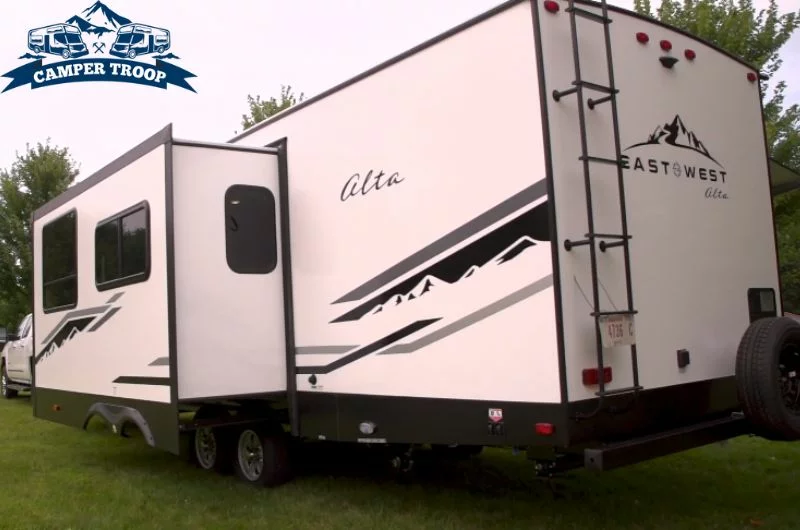
A slide-out is a recreational vehicle component, primarily a type of panel that you can extend. It’s mainly used when the vehicle is parked.
To make it more precise, it’s a common feature of an RV with which you can create additional space for living. That means you can extend or retract it on your camper depending on when you require living space.
A slide-out moves by hydraulic or electric power, depending on the system. Each system has its own adjustment points and steps. That is why you need to know which one you have before you pick up a wrench.
Read Also: Forest River Battery Disconnect Switch Location and Purpose
What Slide-Out System Does My Forest River RV Have?
Forest River does not use just one slide-out system. It uses several Lippert systems, and the one you have depends on your model. According to Forest River’s component manuals, these include:
- In-Wall (Schwintek)
- Through Frame Electric
- Through Frame Hydraulic
- Bed Slide Hydraulic
- Power Gear Electric
- Slim Rack
- Above Floor
The three most common types work like this:
| System | What moves the room | Guide type |
|---|---|---|
| In-Wall (Schwintek) | Two gear-reduction motors, one at each end of the room | Not rack and pinion |
| Through Frame Hydraulic | Hydraulic cylinder | Rack and pinion |
| Through Frame Electric | Electric actuator motor with a ball screw | Rack and pinion |
How do you identify your slide system?
- Check the owner’s packet that came with your RV. It usually includes the slide-out component manual.
- Look up your model and year on Forest River’s website and open the slide room component manual.
- Look at the room. A Schwintek slide has a motor at each end of the room. A through-frame slide has its drive mechanism under the floor, attached to the frame.
- If you are still unsure, ask your Forest River dealer. Give them your model, year and VIN.
How Does Forest River Slide-out Work?
Forest River slide-outs run on an electrical control system. On most units, you operate the room with a switch inside the RV. Press it one way to extend the room and the other way to retract it. The exact control varies by model, so check your manual.
The drive setup depends on the system. Schwintek in-wall slides use a pair of gear-reduction motors, one at each end of the room. Hydraulic systems move rooms with hydraulic cylinders. Through-frame electric slides use an electric actuator motor. Lippert’s slide systems operate as negative ground systems.
Let the room travel all the way in or out in one smooth motion. Stopping and starting midway can make the room harder to keep square and sealed.
What Are the Signs Your Slide-Out Needs Adjustment?
Your slide-out likely needs adjustment if you notice any of these:
- Daylight or a gap around the seal when the room is in or out
- Water leaks or drafts near the slide opening
- The room sits crooked or one end moves ahead of the other
- Binding, scraping or jerky movement
- The seal presses tight on one side and loose on the other
- The room rubs the top or bottom of the opening
How Can You Adjust a Forest River Slide-out?
The 9 steps below apply to Lippert through-frame slides, which use a rack and pinion guide system. This system comes in two versions. One moves the room with a hydraulic cylinder. The other uses an electric ball screw. If you have a Schwintek in-wall slide, skip to the Schwintek section further down.
Use the slide-out control system to move the room. Do not push or pull the room with other equipment unless your manual tells you to. Doing so can damage the slide or cause injury.
Read Also: Forest River Slide Out Seals: Types & Replacement Guideline
Some of the precautions that you can take before adjustments are listed below:
- Clear everything nearby that might obstruct the Slide-out while actuation
- Make sure that no one is near the coach
- Maintain a safe distance during slide-out actuation mechanisms
- Level and stabilize the RV first. A twisted frame can make a room bind or seal unevenly, which hides the real problem.
What tools do you need?
- Wrenches or sockets that fit your jam nuts, nylock nuts and carriage bolts (sizes vary by unit)
- Tape measure
- Marker or paint pen to mark bolt positions
- The component manual for your slide system
- A helper to watch the room while it moves
Here are the steps for adjusting a Forest River through-frame slide-out:
Step 1: Inspect Battery Charge
The slide needs full power to move and seal properly. Make sure your RV battery is fully charged and working before you start. A weak battery can make the room move slowly or stop short, which looks like an adjustment problem when it is not.
Step 2: Check and Remove travel locks
Check whether your room has travel locks. If it does, remove them before you extend the room.
Step 3: Extend the room
Press and hold the switch until the room is fully extended and the seal presses against the unit. Then check the inner seal all the way around.
Step 4: Adjust Nylock and Jam nut
If the inner fascia does not seal when the room is out, adjust the out-stop. The out-stop is set with a nylock nut and a jam nut.
Loosen the jam nut with a wrench. Then turn the nylock nut to move the stop until the inner fascia seals. Tighten the jam nut again to lock the setting.
Step 5: Retract Fascia
Retract the room fully. The outer fascia should seal against the unit. If the outer seal does not seal, adjust the jam nut and the stop can.
Use a wrench to loosen the jam nut and move the stop back. Then tighten the nut against the stop can. Run the room in again and check that the outer seal is tight.
Step 6: Re-Sync the room
If one side of the room seals and the other side does not, the room may be out of sync.
On many through-frame slides, you re-sync by loosening the bolts at the idler arm, then pushing or pulling the room on the drive side until both sides line up. Retighten the bolts afterward. The exact parts and steps can vary, so confirm the procedure in your slide manual first.
Read Also: Forest River Water Pump Not Working: Reasons And Solutions
Step 7: Vertical Adjustment
You need a vertical adjustment if the top or bottom of the room does not seal properly.
Firstly, you need to measure between the bottom of the room and the outer arm / inner arm.
If the distance is outside the tolerance listed in your manual, it needs adjusting. Mark the position of the carriage bolts on the head assembly, then loosen them. This frees the room bar from the head assembly.
Next, loosen the jam nut and turn the adjustment bolt to raise or lower the room. Tighten the jam nut and measure again. When you are within tolerance, tighten the carriage bolts.
Repeat the same process on the other side. Keep both sides at the same measurement so the room stays level.
Step 8: Inspect Gaps
Run the room in and out a few times. Check for any gap in the seal at both the fully extended and fully retracted positions.
Step 9: Horizontal Adjustment
Now check whether the room is centered side to side. Measure the distance between the room and the wall of the opening on both sides.
If the room is off-center, loosen the carriage bolts on both head assemblies. With the bolts loose, push the room by hand toward center.
Measure again to confirm the room is centered in the opening. Then tighten the carriage bolts so the room is tight to the head assemblies. Check your manual for any model-specific steps.
Read Also: Why Is The Forest River Furnace Not Working?[With Solutions]
How Do You Adjust a Schwintek In-Wall Slide-Out?
Schwintek in-wall slides do not use the nuts, idler arm or head assemblies from the steps above. They are not rack and pinion. Instead, a gear-reduction motor at each end of the room drives it, and an electronic control board manages both motors.
Because of this, sync and travel problems on Schwintek slides are handled through the controller and the motors. Follow the steps in Lippert’s In-Wall (Schwintek) Troubleshooting Manual for your control board.
Also check power. The Schwintek system needs at least a 30-amp circuit breaker. Low power or a weak battery can cause one motor to lag behind the other.
What do Lippert slide error codes mean?
Lippert electronic slide controllers detect faults and can signal them while the room is running. The meaning of each code depends on your controller and board revision. Look up the code in the troubleshooting manual for your exact system rather than guessing. Fix the cause the code points to before running the room again.
Why Does My RV Slide-Out Only Move on One Side?
A room that moves on one side is out of sync or has a drive problem on one end. The likely cause depends on your system:
- Schwintek in-wall: Each end has its own motor. A failed motor, loose connection or low power can stop one end. Use the troubleshooting manual to test each motor.
- Through-frame rack and pinion: The room may need re-syncing at the idler arm (Step 6). Bent or damaged parts can also cause it.
- Any system: An unlevel RV, an obstruction or a stuck seal can make one side drag.
Stop running the room if it twists badly. Forcing a crooked room can bend parts.
Why Won’t My Forest River Slide-Out Seal All the Way?
On a through-frame slide, match the problem to the fix:
| Problem | Likely fix |
|---|---|
| Inner seal gaps when room is out | Adjust the out-stop jam nut and nylock nut (Step 4) |
| Outer seal gaps when room is in | Adjust the jam nut and stop can (Step 5) |
| One side seals, other does not | Re-sync the room (Step 6) |
| Top or bottom does not seal | Vertical adjustment (Step 7) |
| Room off-center in opening | Horizontal adjustment (Step 9) |
Also rule out a weak battery and worn or folded seals. A damaged seal will not close a gap no matter how well the room is adjusted.
How Do You Manually Retract a Forest River Slide-Out?
Yes, you can manually retract the slides in a Forest River RV. This is useful when the slide gets stuck while extended or halfway in. The method depends on your system, so use the manual override section of your slide manual.
For Lippert In-Wall (Schwintek) slides, the Schwintek troubleshooting manual describes two options:
- Clear the area around the room and make sure no one is near it.
- Try the electronic manual override first. It is available on control boards revision C1 and newer.
- If the override does not work, turn off power to the slide controller. Then unplug both motors from the circuit board. This releases the motor brake.
- Move the room in by hand, keeping both ends even.
- Have the system checked before you use the slide again.
Warning: Lippert’s Manual Override document says the electronic override turns off fault detection. Do not use it to force a room that is binding. Lippert also states that damage from misusing the override disqualifies all claims under its Limited Warranty.
For through-frame hydraulic or electric slides, follow the manual retract steps in that system’s owner’s manual. The process is different from the Schwintek method.
Does Adjusting Your Slide-Out Yourself Void the Lippert Warranty?
The one clear rule from Lippert is about the manual override. Damage caused by misusing it disqualifies all claims under Lippert’s Limited Warranty.
For other DIY adjustments, check your Forest River and Lippert warranty terms before you start. If your RV is still under warranty, call your dealer first. Let them confirm what you can do yourself and what they need to handle so a claim is not put at risk.
How Do You Maintain Slide-Out Seals?
Good seals make adjustments last. Add these checks to your routine:
- Look for cracks, tears, flattening or folded seal edges.
- Clean dirt and debris off the seals and the slide floor.
- Treat rubber seals with a product made for RV slide seals, as your manual recommends.
- Watch the room move and listen for scraping or uneven travel.
If a seal is worn out, replace it. See our Forest River slide-out seals guide for types and replacement steps.
What If a Hydraulic Slide Has Fluid or Pump Problems?
Hydraulic through-frame slides move with a hydraulic cylinder, so the fluid and pump matter. If the room moves slowly, stops or will not hold position, check the system before adjusting anything.
- Check the fluid level the way your hydraulic slide manual describes. Use only the fluid type it lists.
- Look for wet spots or drips at hoses, fittings and cylinders.
- Make sure the battery is charged so the pump gets full power.
Leaks and pump failures are usually a job for a technician. Do not try to adjust stops to make up for a weak pump.
When Should You Call an RV Technician?
Stop and call a dealer or RV technician if:
- The room binds, twists or makes grinding noises
- You see bent racks, arms or brackets
- A hydraulic system leaks fluid
- The controller keeps showing faults after basic checks
- The room goes out of sync again soon after you fix it
- Your RV is under warranty and you are not sure the work is allowed
Where Can You Find Official Forest River and Lippert Slide Manuals?
- Lippert In-Wall (Schwintek) Owner’s Manual
- Lippert In-Wall (Schwintek) Troubleshooting Manual
- Lippert In-Wall (Schwintek) Manual Override
- Lippert Through Frame Hydraulic Owner’s Manual
- Lippert Through Frame Electric Owner’s Manual
- Lippert Electric Slide-Out Manual (Forest River)
Final Words
Owning a recreational vehicle has a lot of things to deal with. Mostly, when you see that there are spaces between seals of the slide-out, it would feel frustrating.
This guide covers the full adjustment process for through-frame slides, including the out-stop, in-stop, re-sync, vertical and horizontal adjustments. It also explains how Schwintek in-wall slides differ and how to retract a stuck room safely.
Forest River uses several Lippert slide systems, so start by confirming which one your RV has. Then follow the matching manual. If the room binds, leaks fluid or keeps going out of sync, let a technician take over.
Read Also: How To Fix Forest River Slide Out Problems
Forest River Slide-Out Adjustment FAQs
How do you re-sync a Schwintek slide-out?
You re-sync a Schwintek in-wall slide through its electronic control board and motors, not the idler arm used on through-frame slides. Follow Lippert’s In-Wall (Schwintek) Troubleshooting Manual for your control board. First confirm a charged battery and at least a 30-amp breaker, because low power can make one motor lag behind the other.
How do I adjust the stop on a Lippert slide-out?
On a Lippert through-frame slide, the out-stop uses a nylock nut and a jam nut. Loosen the jam nut and turn the nylock nut until the inner fascia seals. Then retighten the jam nut. For the in-stop, loosen the jam nut, move the stop back, and tighten it against the stop can.
Why should the RV be level before adjusting a slide-out?
You should level the RV first because a twisted frame can make the room bind or seal unevenly. That can hide the real problem and lead you to adjust the wrong part. Level and stabilize the RV before you set the stops, re-sync the room, or make vertical and horizontal adjustments.
Can a weak battery cause Forest River slide-out problems?
Yes, a weak battery can cause slide-out problems. It can make the room move slowly or stop short, which looks like an adjustment problem when it is not. On Schwintek slides, low power can also make one motor lag behind the other. Fully charge the battery before you adjust anything.
Should you stop a slide-out partway while it is moving?
No, you should let the room travel all the way in or out in one smooth motion. Stopping and starting midway can make the room harder to keep square and sealed. The exception is a room that twists badly or binds. Stop it and do not force it, because forcing a crooked room can bend parts.