
Quick answer: Most Freightliner M2 bulkhead module (BHM) problems come from wiring, not the module. Common causes are loose or corroded harness connectors, datalink (J1939/J1708) faults, shorted wires, a BHM that stays awake and drains the battery, and failed outputs such as lights or the horn. Check fuses, power, grounds and connectors before you buy a new module.
A complex system of modules works together to make the Freightliner M2 truck run properly. The bulkhead module is the main electrical control unit that oversees this teamwork. So, every M2 owner should know the issues that can affect it.
The most typical Freightliner M2 bulkhead module problems involve faulty wiring and connections. When this happens, the bulkhead module can’t process the signals it receives. As a result, it may not respond to scan tools or to the driver’s inputs.
A malfunctioning bulkhead module can confuse the driver with fault codes that don’t match the real problem. Knowing how the BHM works makes these situations much easier to handle.
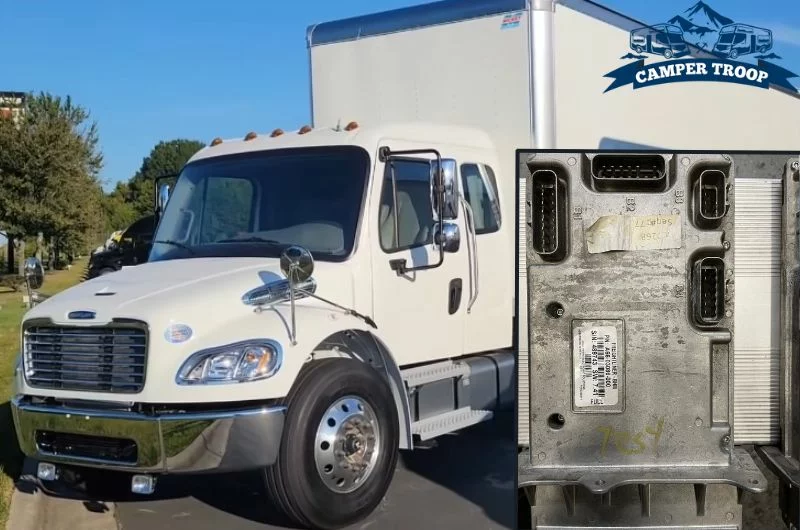
What Does the Bulkhead Module Do on a Freightliner M2?
The bulkhead module (BHM) is the central controller for the M2’s other electrical modules, often called slave modules. It receives switch and sensor signals, decides what to do, and sends commands to the parts that need to act.
The BHM works alongside the Chassis Module (CHM) and the Instrumentation Control Unit (ICU). When one of them wakes up, such as when you turn the ignition on, all three wake up together.
Which Freightliner M2 Trucks Have a Bulkhead Module?
The bulkhead module is not a recent addition. The Business Class M2 has used a multiplexed electrical system built around the BHM from its early years, and bulkhead modules for 2007 M2 trucks are documented.
Module names and layouts differ between Freightliner models. If you drive a model other than the M2, check its own service manual before you follow the steps in this article.
What If My Motorhome or RV Hauler Is Built on an M2?
If your motorhome, toter or RV hauler sits on an M2 chassis, BHM problems look the same as on any M2 truck. Common examples are dead chassis lights, a horn or wipers that act up, or a battery that is flat after the rig sits at a campsite.
RV builders often add their own wiring for house systems. Keep that in mind when you trace a fault. A problem may come from the coach side, not the chassis side. If your RV uses a Freightliner Custom Chassis, ask the chassis maker or a Freightliner dealer whether your chassis uses a BHM before you order parts.
Where Is the Bulkhead Module Located on a Freightliner M2?
The BHM is commonly described as sitting on the front wall (firewall) under the hood, on the engine side, a little below the steering column. Harnesses plug into it from the engine side, and dash harnesses connect on the cab side. Confirm the exact spot for your year in your service manual.
5 Most Common Issues with Freightliner M2 Bulkhead Module:
The bulkhead module is the central controller of your truck’s slave modules. It keeps control by receiving, processing and sending data signals.
Data cables and wire harnesses carry these signals. So, problems with either one can make the BHM on your Freightliner act up.
1. Misfiring Harnesses
Several harnesses connect the bulkhead module to the slave modules and other parts. These connections let the BHM control and coordinate the different parts of your truck’s electrical system.
So, if these harnesses fail or have a poor connection, several systems in your truck might act up at once.
The BHM is commonly described as having several main harness connections on the engine side, such as the chassis, engine and front wall harnesses, plus dash harnesses on the cab side. The exact count and layout can vary, so check the wiring diagram for your truck.
Bad harness connections can create fault codes that don’t make sense. As a result, the driver might get the wrong idea about what is really wrong.
You may need to clean, repair or replace a faulty harness. Dirt, corrosion, water, power spikes and other factors can cause this damage.
If you take it to a shop, the bill will include inspection time and labor on top of any parts. Ask for a written estimate before work starts, because harness repairs vary a lot in time and cost.
2. Datalink Issues
Datalinks are the communication networks that let modules, switches and sensors in your truck share signals very quickly.
These links cut down on the wiring the truck needs. They also let each module report its own problems to the rest of the system.
When the bulkhead module or its datalink wiring is compromised, the modules can lose contact with each other. As a result, a scan tool or diagnostic laptop may not connect properly with your Freightliner.
Rule out wiring first. If the module itself is at fault, it may need reprogramming. If it is beyond repair, you will need a replacement module, which must usually be programmed with dealer software. See the cost and programming sections below.
Read Also: RV Kitchen Faucet Spout Came Off: 8 Must-Try Steps To Fix It!
3. J1939 and J1708 Datalink Faults Due To Shorted Wire
J1939 and J1708/J1587 are not fault codes. They are the datalinks the BHM and other modules use to talk to each other. Faults travel over these networks as SPN/FMI codes.
- SPN (Suspect Parameter Number): tells you which part or signal has the problem.
- FMI (Failure Mode Identifier): tells you what kind of problem it is, such as a short, an open circuit or a signal out of range.
Freightliner’s current tool for reading these codes on the M2 is DiagnosticLink. The older ServiceLink software was replaced by DiagnosticLink in 2014 and is no longer supported. Look up each SPN/FMI pair in DiagnosticLink or the service manual for your truck, since the meaning depends on the module that sent it.
If your truck has harness or datalink problems, you might have trouble connecting a laptop at all. And if you do connect, the codes may be scattered and confusing.
If the laptop connects normally but you still see datalink-related fault codes, a shorted wire is a likely suspect.
The BHM handles input and output commands for many parts. So, a shorted wire in a circuit such as the ignition switch, cigar lighter or horn can cause trouble.
That short can make the BHM log a fault code. Finding and repairing the shorted wire should clear the problem in this case.
4. BHM Awake Mode Issues (Battery Drains Overnight)
The BHM, CHM (Chassis Module) and ICU (Instrumentation Control Unit) all wake up together when any one of them is activated. This happens when you turn on the ignition key.
Sometimes the BHM stays awake after you turn the ignition off. When that happens, the modules keep drawing power, and the battery runs down.
For example, you park, go inside for a meal or stay overnight at a campground, and come back to a dead battery.
A common suspect is the ignition switch. If the switch does not fully return to Off, or if it sends a faulty signal, the system may read it as On and stay awake.
So, make sure the key is fully off before you leave the truck. If the drain continues, have the ignition switch and its wiring tested and replace the switch if it is faulty. On an RV, also check coach-side accessories that may be wired to chassis power.
5. Numerous Output Issues
When the driver gives an input, such as pressing a switch, the signal goes to the BHM. The module reads the signal and creates the right output.
The BHM is commonly linked to many systems on the M2, such as the A/C clutch, backup lights and alarm, horn, cigar lighter, clutch, parking brake and low air pressure warning. The exact list depends on how your truck was built.
A malfunctioning BHM can affect several of these systems. If many unrelated parts stop working at the same time, the BHM or its power and ground supply is a strong suspect. Rule out shared fuses, grounds and connectors before you condemn the module.
The replacement procedure is covered in a detailed step-by-step guide. The hard part is not unbolting the module. It is programming the new one, which requires dealer software.
Read Also: How to Fix an RV Faucet That Won’t Turn Off? (6 Easy Steps)
What Are the Symptoms of a Bad Bulkhead Module? (Quick Diagnosis Table)
Use this table to narrow down the likely cause. Many of these symptoms can also come from wiring, so always check the simple things first.
| Symptom | Likely cause | What to check first |
|---|---|---|
| Scan tool or laptop won’t connect | Datalink wiring fault, loss of power or ground, failed module | Fuses, battery voltage, grounds, diagnostic connector, datalink wiring |
| Random or confusing fault codes | Loose, dirty or corroded harness connectors | BHM connectors at the firewall, pins, seals |
| Datalink (J1939/J1708) faults while the scan tool connects | Shorted wire in a circuit the BHM controls | Wiring for the horn, ignition switch, lighter and other added circuits |
| Battery dead after sitting | BHM staying awake, ignition switch fault, accessory drain | Key fully off, ignition switch, parasitic draw test |
| Several unrelated systems fail at once | BHM fault or a shared power or ground problem | Main fuses, power and ground at the BHM, then the module |
| One system fails (for example, only the horn) | Fault in that circuit, not usually the BHM | That circuit’s fuse, switch, wiring and load |
Why Won’t My Freightliner M2 Start With No Communication Codes?
A no-start with “no communication” codes usually means the modules can’t talk to each other over the datalinks. The cause is often a power, ground, fuse or datalink wiring problem rather than a dead module. If the BHM can’t share data, other modules may not get the signals they need, and the scan tool may not connect.
Work through the basic checks below. If power, grounds and wiring are good and the module still won’t communicate, have a dealer or heavy-truck shop test it with DiagnosticLink.
How Do You Check a Freightliner M2 Bulkhead Module? (Basic Steps)
These checks need a digital multimeter, basic hand tools and the wiring diagram for your truck. Follow your service manual for exact fuse locations and pin numbers.
- Check the batteries. Make sure they are charged and the cables are clean and tight. Low voltage can cause odd module behavior.
- Check the fuses. Inspect every fuse that feeds the BHM and related modules. Test them with a meter, not just by looking.
- Check power at the BHM. With the meter set to DC volts, confirm the module’s power circuits read close to battery voltage.
- Check the grounds. Test between the ground circuit and a known good ground. Clean and tighten any ground that shows resistance or corrosion.
- Disconnect the battery before unplugging anything. Then inspect each BHM connector for green or white corrosion, bent or pushed-back pins, water and torn seals.
- Test for shorts. With power off, use the meter’s resistance or continuity setting to check suspect circuits for a short to ground or to another wire.
- Read the codes. Reconnect everything and read the SPN/FMI codes with a capable scan tool or DiagnosticLink. Note them before clearing anything.
If you are not comfortable working on truck electrical systems, stop after the battery and fuse checks and take the rig to a shop.
How Much Does a Freightliner M2 Bulkhead Module Cost?
As of November 2026, listings for a replacement M2 bulkhead module range from about $400 to $950 for the part alone. Dealer programming and labor cost extra.
| Part number | Listed price (late 2026) |
|---|---|
| A66-03086-000 | $396.50 |
| 06-75157-001 | $811.49 |
| 06-76799-001 (new) | $950 |
Part numbers vary by model year and options. Give the seller or dealer your VIN to confirm the right module before you buy.
New, Remanufactured or Used: Which Bulkhead Module Should You Buy?
- New: highest price, but no unknown history. Still needs programming to your truck.
- Remanufactured: usually cheaper than new. Ask what was tested or replaced and what warranty comes with it.
- Used: cheapest, but riskiest. It carries the setup of the truck it came from, so it will usually need to be programmed to your VIN before it works correctly.
Can you use a used module from another M2? Only if the part number matches and you can get it programmed for your truck. Plugging in a module from another truck without programming can cause features to work wrong or not at all. Factor the programming cost into the price before you buy.
When Should You Stop Driving With a Bad Bulkhead Module?
Stop driving and get help if a BHM problem affects anything you need to drive safely. That includes:
- Headlights, turn signals, brake lights or marker lights
- Windshield wipers in rain or snow
- Air brake warnings, gauges or the parking brake
- The horn or backup alarm
If only a comfort feature such as the cigar lighter fails, you can usually drive to a shop. When in doubt, have the rig towed.
How To Prevent BMH Issues On Your Freightliner m2?
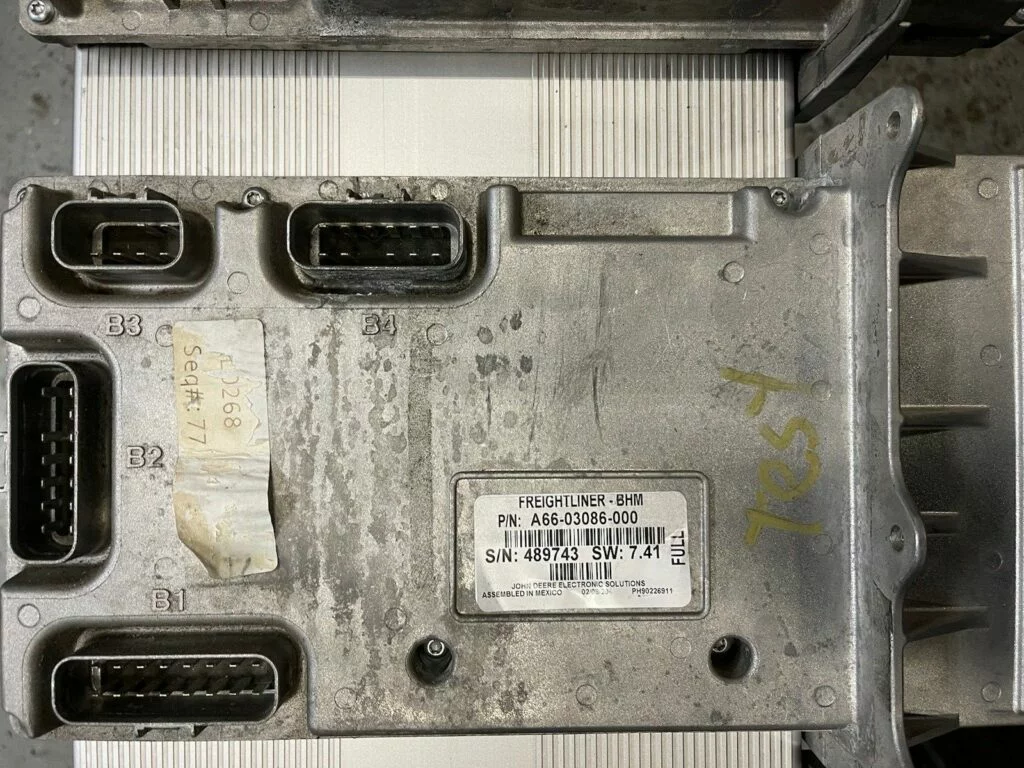
Replacing and programming a BHM is a costly repair. So, the best plan is to keep wiring problems from starting in the first place.
The bulkhead module sits on the firewall, where water, road spray and dirt can reach its connectors. A few simple habits help protect it:
- Regularly inspect the bulkhead module and its connectors.
- Check for corroded wires and connections and repair them. Bad connections can cause power spikes and damage your bulkhead module.
- Keep the engine bay clean. Dirt and debris build up after long highway trips and can hold moisture against connectors.
- Keep water away from the firewall. Avoid spraying the connectors directly when you wash the engine bay, and fix any leaks that drip onto the module.
- Replace torn connector seals. If your service manual allows it, a thin coat of dielectric grease on the seals can help keep moisture out.
- Replace all malfunctioning harnesses as soon as possible.
- On an RV, have added coach wiring done properly. Poor splices into chassis circuits can cause shorts and battery drain.
Read Also: Where Can I Find My RV Paint Code Location (Answered)
Is Reprogramming Freightliner BMH Possible?
Yes, but you need Freightliner’s dealer software. Freightliner says DiagnosticLink is the tool for M2 and BHM work. ServiceLink is no longer supported.
What Software Do You Need to Program a Freightliner Bulkhead Module?
- DiagnosticLink Professional: DiagnosticLink is subscription-based and needs a license key. Only the Professional edition can reprogram modules such as the BHM. The Standard edition cannot.
- A supported version: Freightliner currently supports only versions 8.22, 8.23 and 8.24. Versions 8.00–8.21 are obsolete. An unsupported copy shows a “Your Copy of DiagnosticLink Has Been Disabled” message.
- A laptop, a compatible datalink adapter and an internet connection.
- Your Vehicle Identification Number, so the module can be set up for your truck.
The exact screens and steps depend on the software version. Follow Freightliner’s current procedure in DiagnosticLink rather than an old step list.
Does a New Bulkhead Module Need to Be Programmed?
Plan on it. A new, remanufactured or used BHM must be set up for your truck’s VIN and options before everything works as it should.
Is DIY Replacement Realistic for RV Owners?
Swapping the module itself is within reach for a careful DIYer. Programming is the problem. Without a paid DiagnosticLink Professional subscription, most RV owners can’t program the BHM at home.
A practical approach is to do the basic checks yourself, confirm the module is really at fault, and then let a Freightliner dealer or heavy-truck shop install and program it. Ask for the programming price up front.
Read Also: EMS-PT30X Vs SSP-30XL Surge Protector: Which One To Choose?
Are There Recalls or Warranty Coverage for the M2 Bulkhead Module?
Check before you pay for a repair. Enter your VIN on NHTSA’s recall lookup at nhtsa.gov/recalls, and ask a Freightliner dealer to check for open campaigns or service bulletins on your truck. If you bought a new or remanufactured module, keep the receipt, since the seller’s parts warranty may cover a failure.
FAQs.
You now have a solid base for dealing with BHM issues on your Freightliner. You may still have questions, so here are a few common ones.
Can I continue driving my Freightliner with a faulty m2 BHM?
It depends on what has failed. If the problem affects lights, wipers, air brake warnings or other safety systems, stop and get help. Harness and datalink faults can also stop a scan tool from connecting, which makes roadside diagnosis hard. If only a comfort feature has failed, you can usually drive carefully to a shop.
How much does it cost to replace the BHM?
As of November 2026, listings for a replacement Freightliner M2 bulkhead module range from about $400 to $950 for the part alone. Dealer programming and labor cost extra. Many BHM problems turn out to be harness, connector or shorted-wire issues, so check the wiring before buying a module.
Where can I find the BHM in my Freightliner?
The BHM is commonly described as sitting under the hood on the engine side of the front wall (firewall), a little below the steering column. Check your service manual to confirm the exact location for your model year.
Do All Freightliners have BHM?
Not all Freightliner models use the same modules, but the bulkhead module is not new. The Business Class M2 has used a multiplexed electrical system built around the BHM from its early years, and 2007 M2 bulkhead modules are documented. Check the service manual for your model to see which modules it uses.
Conclusion
Freightliner M2 bulkhead module problems can be frustrating on the road. Rushing to replace parts rarely helps. The better plan is to work step by step: battery, fuses, power, grounds, connectors, then the module.
If you do need to replace the BHM, follow proper safety steps. Always disconnect the battery before you start working, and plan for dealer programming with DiagnosticLink Professional.
Using the proper tools protects both you and your truck. Lastly, keep the BHM connectors clean and dry, so you can avoid a module, programming and labor bill.
Read Also: What Does E1 Code On Dometic Thermostat Mean: How to Fix It?