Quick answer: Most Winegard Air 360 problems are poor reception, missing channels, splitter or coupler signal loss, and no signal at all. Start by checking antenna power, coax connections, TV input, and tower distance, then rescan. The standard Air 360 handles TV and FM only, so Wi-Fi problems involve a Gateway on an Air 360+.
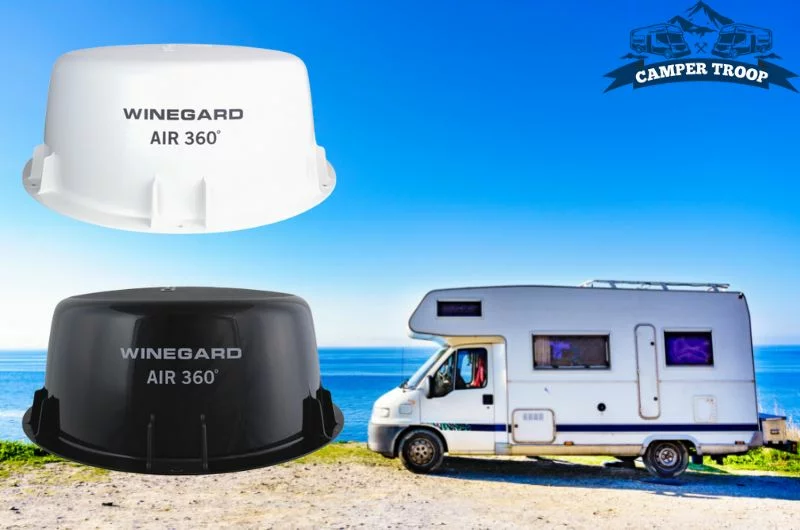
The Winegard Air 360 is an amplified TV and radio antenna for RVs. Out of the box, it receives VHF, UHF, and FM signals while the RV is parked.
It is omnidirectional, so it is designed to work without aiming. This antenna is an upgraded version of an earlier Winegard product in the RV industry.
Even so, problems can appear, especially connection interruptions. Let’s look at why they happen and how you can fix them.
Does the Winegard Air 360 Have Wi-Fi? Check Your Model First
No, the standard Air 360 does not have Wi-Fi or cellular service. Winegard’s Air 360 page covers it as a TV and radio antenna. An Air 360+ can add Wi-Fi and cellular, but only when paired with a separately sold Winegard Gateway.
| Setup | TV and FM | Wi-Fi | Cellular |
|---|---|---|---|
| Standard Air 360 (A3-2000/A3-2035) | Yes | No | No |
| Air 360+ without a Gateway | Yes | No | No |
| Air 360+ with a compatible Gateway | Yes | Yes | Yes |
Not sure which one you have? Check your RV paperwork or antenna manual for the model. Then look for a Winegard Gateway router inside the RV. If there is no Gateway, your Air 360 setup is not providing Wi-Fi or cellular service.
Which Winegard Gateway Works With My Air 360+?
It depends on your dome. Gateway 5G requires the 5G dome, which has 4 cellular antennas. The original dome and the V2.S each have 2 cellular antennas, according to RV Mobile Internet’s Air 360 gear guide.
Confirm your dome version with Winegard Support before you buy a Gateway.
4 Common Problems with Winegard Air 360 & How You Could Fix Them:
No device is free of faults, and the Winegard Air 360 has a few common problems. Let’s see what they are, why you may face them, and how to fix them.
1. Poor Reception
Poor reception means the antenna is not getting a strong, clean signal from the broadcast tower. You may see a broken-up picture or lose some channels.
Trees, hills, and large buildings between your RV and the tower may weaken reception. Long distance from the tower can also be a factor.
Overhead power lines and other electrical sources may play a part too. In addition, LTE cell phone towers can interfere with over-the-air TV reception. Winegard sells an LTE/5G filter aimed at this problem. Confirm that it fits your setup before buying.
Because the Air 360 is omnidirectional, an antenna rotator is not a standard fix. Try these steps instead:
- Confirm that the antenna amplifier has power.
- Tighten every coax connection you can reach.
- Check how far you are from local broadcast towers.
- Remove any splitter you do not need.
- If you can, move the RV away from obstructions or nearby sources of interference.
- Run a new channel scan.
Read Also: How To Maintain TPO RV Roof? [Complete Guide]
2. Missing Channels
If a channel disappears, run a new channel scan on the TV. If the channel still does not return, the cause may be a weak signal from that station, a TV setting, or a problem in the cable path.
Splitter issues, loose cables, and electrical interference may all play a part. Weather may also affect some signals.
Distance matters too. As you get farther from a TV station’s tower, that station may become harder to receive.
Follow this order before you call an expert:
- Check that your Winegard antenna is turned on.
- Connect the coax cable firmly.
- Set the TV to its antenna input. If the tuner menu offers Antenna or Cable, choose Antenna.
- Run a full channel scan.
- Look up your location in the FCC DTV Reception Maps to see which stations you should expect.
Do I Need to Rescan Every Time I Move My RV?
Rescan when you reach a new broadcast area or when a channel disappears. If you moved only a short distance and all your channels still work, you can skip it.
Can a Missing Channel Be an ATSC 3.0 Issue?
Yes, it can. ATSC 3.0, also called NextGen TV, must be decoded by the tuner in your TV or receiver. If your tuner does not support ATSC 3.0, it cannot show a station that is available only in that format. Check your TV’s specs before you blame the antenna.
3. Coupler and Splitter Issues
Couplers and splitters let one antenna feed more than one cable path, but too many of them can weaken your signal.
In an RV antenna system, a coupler is a passive device that transfers or combines signals between coaxial lines or connects cable segments. A basic two-way splitter has three ports: one input and two outputs. Multi-way splitters have more, such as five ports on a four-way splitter.
Too much coupling and splitting reduces signal strength. Keep only the splitters and couplers you need. Replace any part that is loose, corroded, or damaged.
To test a splitter, temporarily remove it and connect one TV as directly as you can. Keep the wall plate or power inserter in line, because an amplified antenna needs power. Then rescan and compare the channel count.
Read Also: RV AC Soft Start Vs Easy Start Kit | Which One is Worth it?
4. No Signal
A No Signal message means the TV is not receiving a usable picture on the selected input. The cause may be power, the TV input, the coax, the antenna, or simply your location.
Weather, distance from towers, and interrupted coaxial cable distribution can also contribute.
To fix this problem, check your Winegard’s power and connections first. Temporarily removing splitters and couplers can help you find a bad part. Arrange the coax so it is not pinched or sharply bent.
Then scan for channels and check again. If that does not fix it, follow the manual and use the tests below. Call an expert if you are not confident or cannot solve it.
Read Also: How to Turn On Backup Camera Sound: 3 Must-try Methods!
How Do I Check the Air 360’s Power and Amplifier Switch?
Start at the wall plate or power inserter, then work back toward the RV’s 12V supply. Without power, the amplifier cannot boost the signal.
- Turn on the wall plate, power inserter, or signal-amplifier switch.
- If your unit has an indicator light, confirm that it is lit.
- Confirm that the RV has 12V power and that the battery disconnect is on.
- Check the fuse for that circuit. Your RV’s manual or fuse panel label should identify it.
- Make sure the coax from the roof and the coax to the TV are both tight.
- Run a new channel scan.
Where Is the Power Button for the Air 360 Amplifier?
The location varies by RV. Look near the TV or on a media or control panel for a wall plate or power inserter with a switch. If you cannot find it, check your RV’s owner’s manual or follow the coax from the TV.
How Do I Reset a Winegard Air 360?
Do a simple power cycle. Turn the antenna power off, wait about a minute, and turn it back on. Then rescan for channels. If that does not help, ask Winegard Support whether your model needs anything more.
Is the Problem in the TV, Cable, Wall Plate, or Antenna Head?
Test the easy-to-reach parts first and change one thing at a time. Rescan after each change so you know which step made a difference.
| Test | What you see | Likely problem area |
|---|---|---|
| Try a second TV on the same coax | The second TV finds channels | First TV, its input, or its tuner settings |
| Swap the short coax between the wall plate and TV | Channels return | The original short cable |
| Check the switch, 12V power, and fuse | There is no power at the wall plate or inserter | Switch, wall plate, inserter, fuse, or 12V supply |
| Temporarily remove splitters and couplers | Channels return or improve | A splitter, a coupler, or too many split paths |
| Check the FCC maps, then repeat the scan | Stations should be available, but all tests above passed and none appear | Roof coax or antenna head |
Why Is My Air 360+ Wi-Fi or Cellular Not Working?
First confirm that you have an Air 360+ dome with a compatible Gateway. Then work out whether the fault is local Wi-Fi or the cellular connection. TV antenna fixes such as rescanning will not solve either one.
If Your Device Cannot See or Join the Wi-Fi
- Confirm that the Gateway has power.
- Restart the Gateway.
- Move your phone or laptop closer and check the network name and password.
- Try a second device to rule out a problem with the first one.
If You Are on Wi-Fi but Have No Internet
- Check that the SIM card is fully seated. Gateway LTE and Gateway 5G each have one Mini SIM slot.
- Confirm that your SIM is on an active data plan with a supported carrier: Verizon, AT&T, or T-Mobile.
- Ask your carrier whether your plan allows use in a router.
- Check that carrier’s coverage at your campsite.
- Confirm that your Gateway and dome are a compatible pair.
- If the fault continues, contact Winegard Support.
How Do I Safely Inspect the Antenna on the Roof?
Inspect the roof only after the indoor checks fail, and only if you can do it safely. If you are unsure, hire an RV technician.
Safety warning: A fall from an RV roof can cause serious injury. Follow these rules:
- Check your RV manual to confirm that the roof can be walked on.
- Stay off the roof when it is wet, icy, windy, or dark.
- Use a sturdy ladder on level ground and keep three points of contact.
- Have a helper stay nearby.
- Keep clear of the roof edges and overhead power lines.
Once you are safely in position, look for:
- Physical damage: cracks, impact marks, or a loose dome.
- Water intrusion: gaps in the sealant around the base, or moisture stains on the ceiling below.
- Corroded connectors: green or white buildup on any coax fitting you can reach.
- Damaged coax: cuts, cracks, pinches, or sharp bends.
What Is the Warranty on a Winegard Air 360?
The Air 360 (A3-2000/A3-2035) has a limited warranty of 2 years on parts and 1 year on labor. Winegard’s 90-day term applies to most parts and accessories. If you own an Air 360+ or a Gateway, confirm its coverage with Winegard.
The warranty covers confirmed defects within the coverage period. Winegard’s warranty policy typically excludes misuse, accidents, unauthorized modifications, and natural disasters.
To make a claim:
- Find your proof of purchase and model information.
- Contact Winegard Support through its help site and troubleshoot the problem with them.
- If Support confirms a defect, it will issue a Return Material Authorization number.
Should You Repair or Replace the Air 360?
Rule out the smaller parts before you replace the antenna head. If the unit may still be under warranty, contact Winegard before you open or modify anything.
- Repair or replace the small part if the fault follows a coax cable, connector, splitter, fuse, wall plate, or power inserter.
- Move the RV and retest if the problem happens at only one campsite. The location may be the cause.
- Consider replacing the antenna head if it is cracked or water-damaged.
- Also consider a new head if power and cables test good, stations should be available, and scans still find nothing.
- Fix any water leak promptly, even if the antenna still works.
FAQs.
Below are some additional questions that people also ask about Winegard air 360. I hope the following short answers help you.
How do I know if my Winegard 360 antenna is working?
Connect your TV to the RV’s antenna coax, set the TV to its antenna input, turn the antenna power on, and run a channel scan. If the scan finds channels, the antenna is likely working. If it finds none, check power, connections, and how far you are from broadcast towers.
Why is my Winegard 360 antenna booster not working?
The booster affects TV and radio reception, not internet service. Check these first:
1. Confirm that the amplifier has power and its switch is on.
2. Check for loose or damaged coax.
3. Confirm that the TV is on the correct antenna input.
4. Look up nearby towers to see whether the signal may be weak at your location.
If the problem continues, contact Winegard Support.
How do I reset my Winegard 360 antenna?
Turn the antenna power off, wait about a minute, turn it back on, and run a new channel scan. If you have a Gateway router, restart it separately. Winegard Support can tell you whether your model needs anything more.
Is the Winegard Air 360 a Wi-Fi booster?
No. The standard Air 360 is an amplified TV and radio antenna. Out of the box, it receives VHF, UHF, and FM signals while parked. For Wi-Fi, you need an Air 360+ dome paired with a compatible Winegard Gateway router.
Can you upgrade to Winegard Air 360?
If you have a compatible Air 360+ dome, you can add a Winegard Gateway. The Gateway is a separate cellular and Wi-Fi router, not a newer version of the antenna. It adds Wi-Fi and cellular internet to the dome. A standard Air 360 has no Wi-Fi or cellular function, so check your model before buying.
Can I fix Winegard air 360 problems on my own?
Generally, yes. Many problems have simple fixes, such as checking power, tightening coax, choosing the right TV input, and rescanning. If the steps in this article and your instruction book do not solve it, or you are not comfortable working on the roof, call an expert.
What should I do if my Winegard air 360 has a technical issue?
Contact Winegard Support first to troubleshoot it. If a defect is confirmed within the coverage period, Support issues a Return Material Authorization number, and you must provide proof of purchase. The Air 360 (A3-2000/A3-2035) has a limited warranty of 2 years on parts and 1 year on labor. Coverage typically excludes misuse, accidents, unauthorized modifications, and natural disasters. Otherwise, you can get help from RV service centers or professionals.
Read Also: 4 Common Problems with Allison Transmission Shift Selector
Final Verdict
The Winegard Air 360 is an amplified, omnidirectional TV and radio antenna that does not need aiming. Wi-Fi and cellular are available only on an Air 360+ paired with a compatible Gateway.
Most troubleshooting comes down to a clear order: confirm your model, check power and coax, select the right TV input, look up nearby towers, and rescan.
In this article, I have covered the common Winegard Air 360 problems with DIY fixes. If those fixes do not work, contact Winegard Support or an RV technician before you replace the antenna.
Read Also: 5 Common Micro Air Easy Start Problems [Solutions Included]